
To solve a Catdoku logic puzzle, look for squares you can rule out before trying to place the next cat. Check the cats already on the board, inspect regions with few possibilities, and ask whether a region reserves a whole row or column. A useful move can be an exclusion, even when you cannot yet place a cat.
This guide applies those steps to Catdoku's colored-region puzzles. We'll use a real Level 3 layout to show how two possible squares can give you a certain deduction elsewhere. Bring the same questions to your next puzzle break.
Practice on today's Catdoku puzzle →
Start with what the rules tell you
Catdoku has three placement rules:
- Each colored region needs exactly one cat.
- Each row and each column needs exactly one cat.
- Cats cannot touch, including diagonally.
For each cat already found, rule out the other squares in its region, row, and column. Check the immediate neighboring squares too. In the app, tap a square to add or remove an exclusion mark, and double-tap to place a cat.
An empty square that survives these checks is a candidate: a possibility still under consideration. It is not automatically the answer. Several candidates can remain even though the finished puzzle has only one solution.
If one region, row, or column has exactly one legal candidate left, that square must hold its cat. First make sure the exclusions that led you there have sound reasons; an unsupported mark can create a misleading “only option.”
A real example: two squares reserve one row
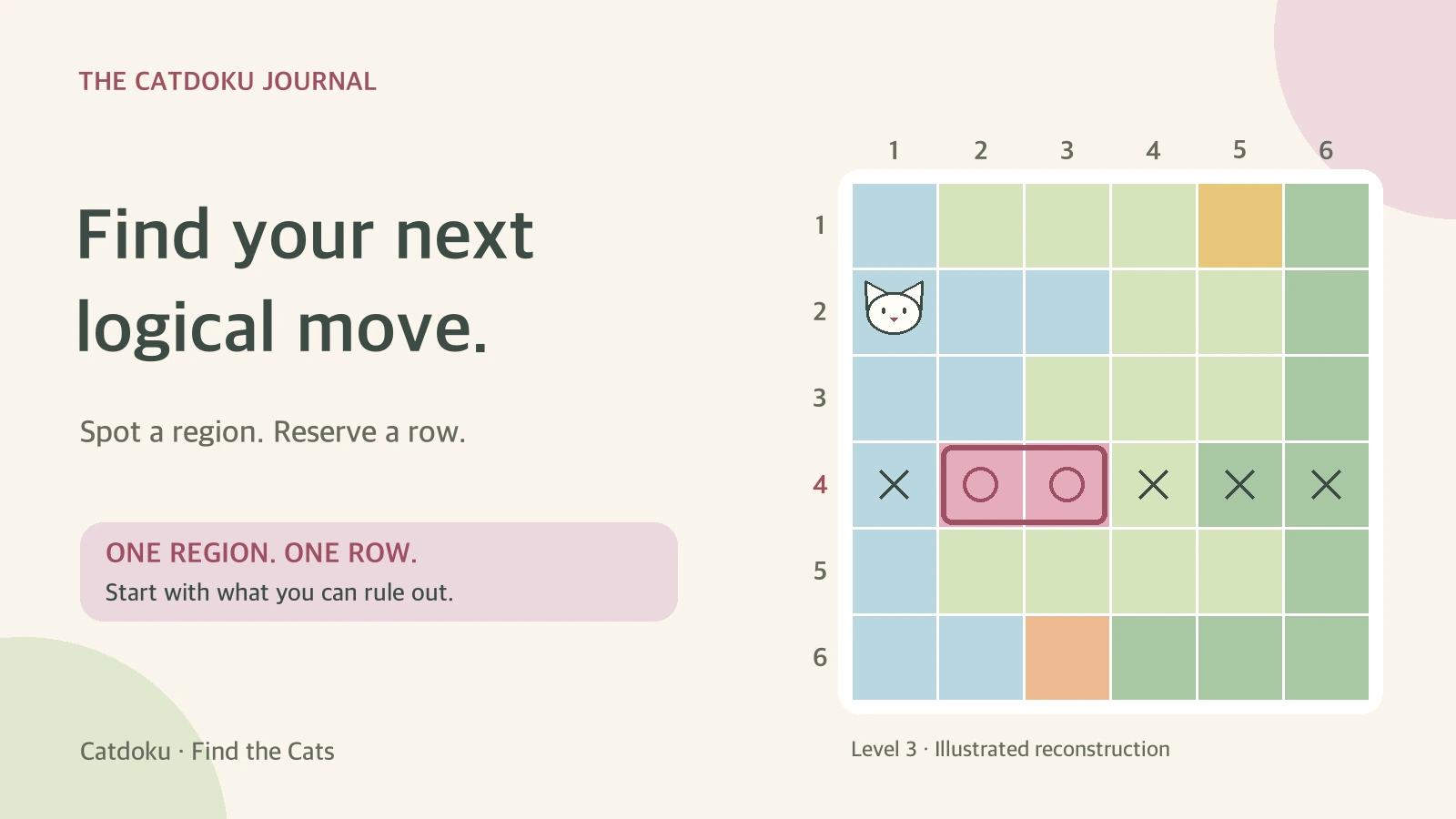
Look at Catdoku Level 3 below. Rows count from the top and columns from the left, starting at 1. The board begins with a cat at row 2, column 1, written as R2C1.
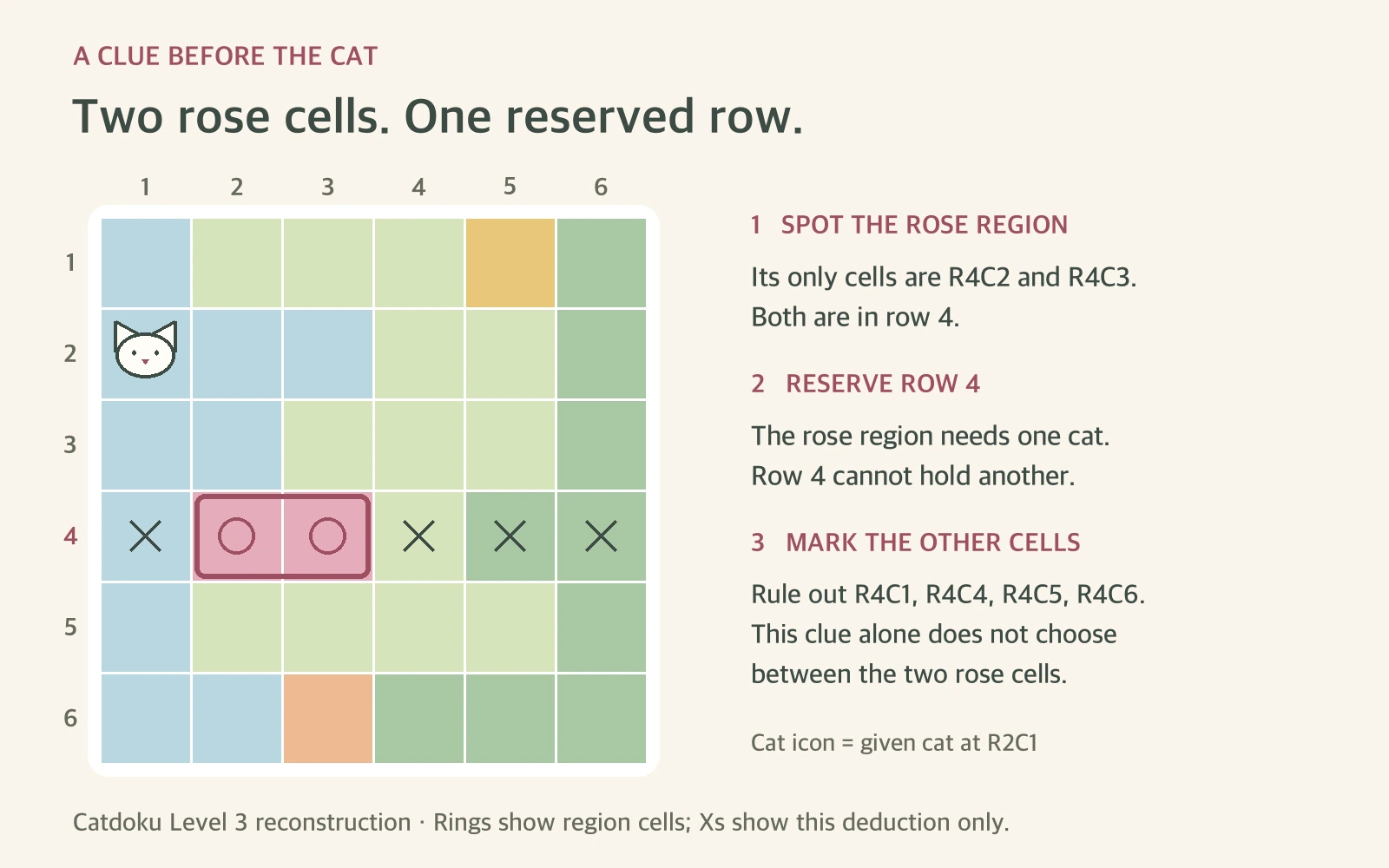
The rose-colored region contains just two squares: R4C2 and R4C3. Both sit in row 4.
Follow the reasoning one step at a time:
- The rose region needs one cat.
- Its cat must be at R4C2 or R4C3.
- Either position puts that cat in row 4.
- Row 4 can contain only one cat, so R4C1, R4C4, R4C5, and R4C6 cannot contain cats.
R4C1 is already ruled out by the starting cat in column 1. The region's shape gives you the additional exclusions at columns 4, 5, and 6.
You have not decided which rose square holds the cat. You have learned something certain about the rest of the row. That distinction is the point of this strategy: you can make progress before choosing between the remaining possibilities.
The same idea works vertically. If every legal candidate for a region lies in one column, that region reserves the column; squares belonging to other regions in that column can be excluded.
Check diagonal neighbors, not an entire diagonal
The no-touching rule includes corners. A cat at R2C1 rules out R1C2 and R3C2 because those squares touch it diagonally.
It does not rule out every square along the diagonal. R4C3 is farther away and does not touch R2C1. Another rule may eventually eliminate it, but diagonal distance alone is not a reason to mark it.
When checking a placement, look at its immediate neighbors. Keep that check separate from the row and column rules, which extend across the whole board.
When you get stuck, review your marks
An exclusion mark records your reasoning. If a region seems to have nowhere left for its cat, examine the marks that removed its candidates. Can you name a rule behind each one?
Tap to remove an unsupported exclusion, or use Undo to reverse a recent player-made marking action. Undo works on those marks; it does not restart the level.
The light bulb offers a contextual hint for the current board. Read its explanation and look at the highlighted cells before applying it. Try putting the reason into your own words: “This region stays in one row, so these other squares are impossible.” Then return to the board and see what changed.
A small routine for your next board
Use this order whenever you want a place to restart your search:
- Check existing cats. Review their rows, columns, regions, and neighboring squares.
- Look for a single candidate. Inspect the regions or lines with the fewest possibilities.
- Look for a reserved line. Can one region's cat only land in one row or column?
- Recheck what changed. An exclusion may leave a new single candidate elsewhere.
For your next Catdoku session, make one deduction you can explain. A few careful exclusions can be a satisfying little puzzle break, even before you finish the board.
Want an easier starting example? Our Sudoku alternative guide shows a Level 2 region containing just one square. Then bring that idea, and today's reserved-row strategy, to your normal levels.
Ready for a harder board? Our Queens puzzle strategy guide adds two more moves, shared pressure and reserved groups, on a Very Hard level.
Like marking empty squares? Nonograms are built on the same habit. Our nonogram guide explains the rules and the overlap trick with a small cat-shaped picture.